About the project
AnonChat is a mobile app for anonymous conversations with random people. Users don't search through profiles or scroll a feed: the app finds them someone to talk to, and from there the conversation decides everything — keep it going, close it, or try to turn it into a friendship.
The challenge
In an anonymous chat, users know very little about the other person, so the first few seconds decide whether a conversation starts at all. We needed to design a flow where getting acquainted happens fast, messaging feels like a familiar messenger, and users always have a clear way out: switch to a new person in one action, without explanations or wasted time.
The first screen with a new match
A conversation starts with a card: avatar, nickname and a short line about the person. Their age and gender are hidden behind a lock labeled “Premium only” — this way the paid subscription is built into the core flow instead of living in a separate section. Below the card are two buttons: “Start chatting” and “New chat” if this person isn't interesting. The message field at the bottom is available right away, so users can write without any extra taps.
Messaging like in a messenger
The chat itself works the way users are used to in popular messengers: incoming and outgoing messages in different colors, timestamps and read receipts. Any message can be replied to with a quote shown above the reply text. Voice messages are displayed with a waveform and duration, and they can be replied to as well. The “New chat” button stays in the header throughout the conversation, and the cross on the left closes the dialog.
The input bar brings together every way to respond: camera, voice message and gallery. A captured photo or video can be edited before sending — for example, adding a caption to the frame via “Edit text” and confirming with “Done”.
Profile and shared media
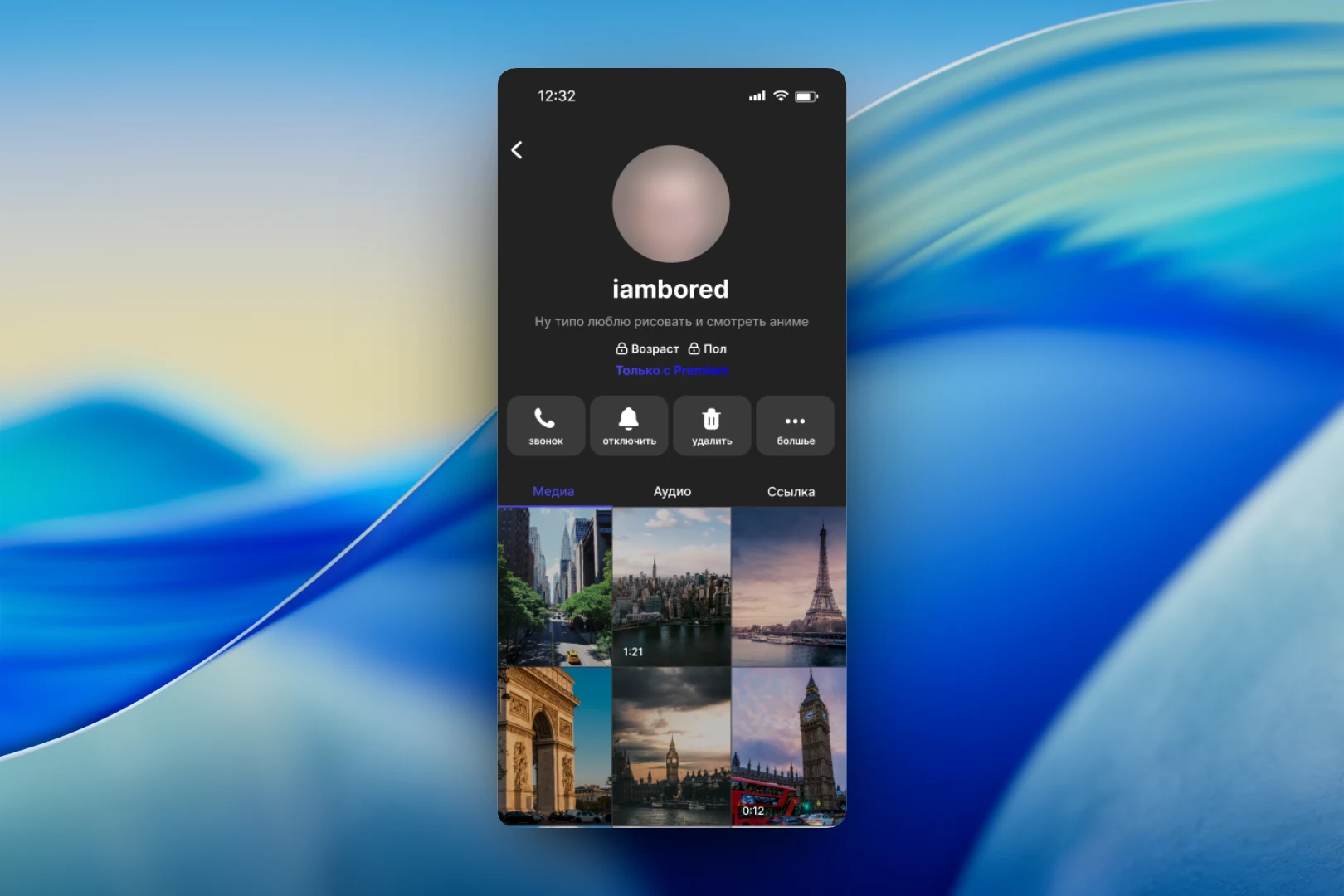
From the chat, users can open the other person's profile. It shows the same nickname and description, age and gender hidden behind Premium, and a row of quick actions: “call”, “mute” notifications, “delete” and “more”. Below is everything the two people exchanged in the chat, sorted into the “Media”, “Audio” and “Link” tabs. Photos and videos are shown in a grid, with the duration visible on video previews.
What happens after a conversation
We gave special attention to the moment a conversation comes to an end. For this there is a bottom panel with three options: “Offer friendship” to keep in touch, “Close chat” and “Find a new chat”. Below them is a “Games” block with cards such as “First date” and “Relationship” — a reason to keep talking if ordinary messaging isn't working out. This screen is shown in the light theme: the interface was designed in two visual variants.
The result
We designed an anonymous chat interface where a random acquaintance takes just a few taps: look at the person's card, start a conversation or move straight on to the next one. Inside is a full-fledged messenger with quotes, voice messages and media, while Premium access and games are built right into the conversation flow.