About the project
An app for the measurement specialists of a company that glazes and finishes balconies. It is a tablet work tool that the specialist brings to a client's home: they create a new measurement, choose the balcony and glazing type, pick finishing materials right on an image of the space and save everything to the client's card.
The challenge
Balcony measurements are usually recorded on paper or in notes, and the client has to imagine the future result from a catalog. We needed to build an app that serves both as a work log for the measurer and as a way to show the client what the balcony will look like with different finishing options. The interface had to be large and convenient for working on a tablet on site.
New measurement
Work starts with the client form: measurement number and date, full name, address, mobile phone and, optionally, email. From here you can move on or open the "Builder" — for a trial measurement or a demo when the data doesn't need to be saved. On the left is a short vertical menu: new measurement, list of measurements, profile and settings.
Balcony and glazing type
The next step is the main specifications. The measurer chooses the balcony type from photo cards: L-shaped and U-shaped balconies up to 5 m, loggias up to 5 and up to 8 m, and the P-44T series (the "iron"). Then comes the glazing type: with a parapet or floor-to-ceiling. The selected options are highlighted with a yellow frame, so it's hard to make a mistake even in a hurry.
Choosing finishes
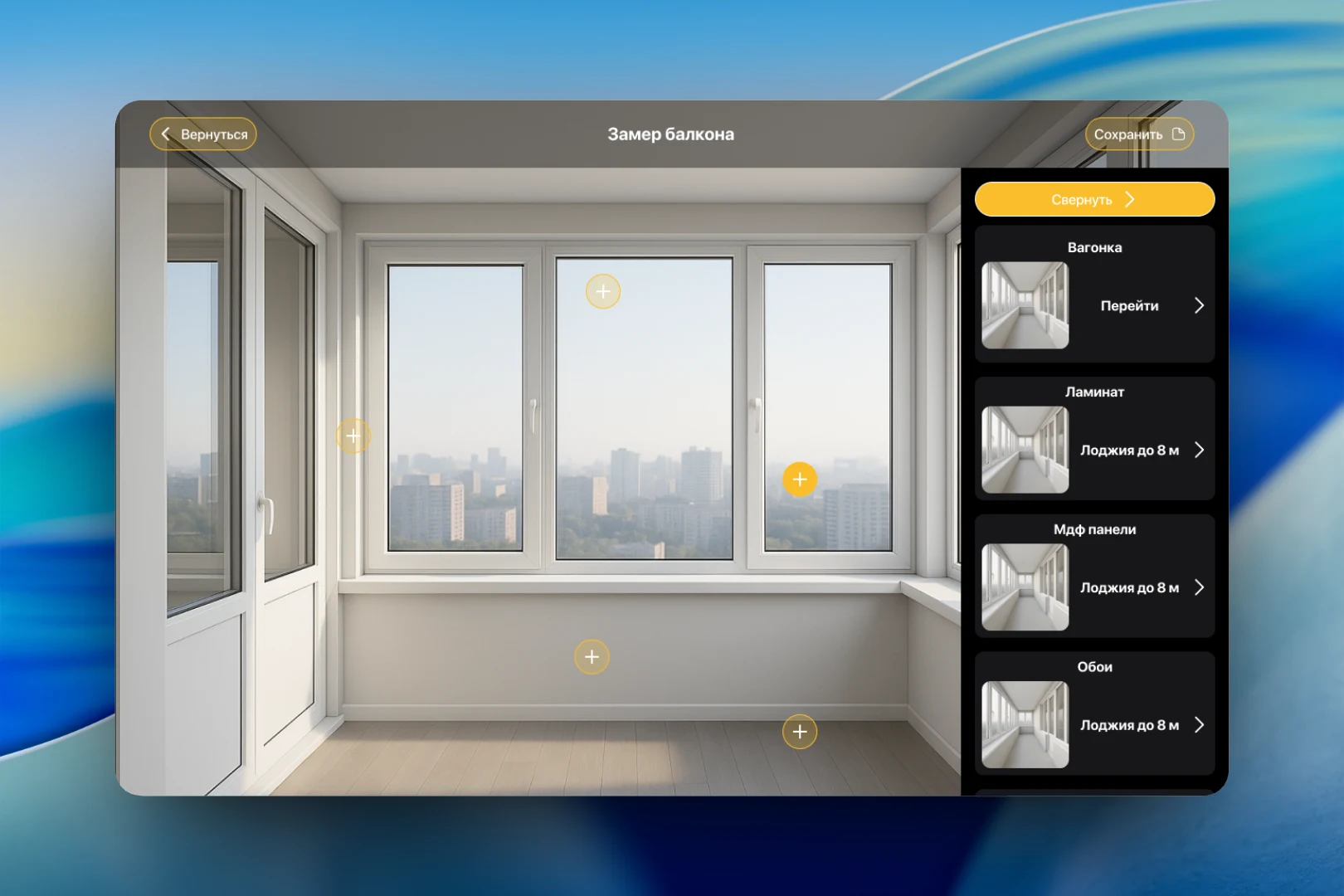
The main screen is the balcony visualization. Points are placed on the image of the space: windows, walls, windowsill, floor. By tapping them, the measurer opens the materials panel on the right — wood paneling, laminate, MDF panels, wallpaper — and shows the client the options right on the picture. The panel collapses so nothing gets in the way of viewing the result, and the outcome is saved with a single button.
Measurement log
All measurements are stored in the "Your measurements" section: on the left is a list with the number, date and client name, on the right is the card of the selected measurement with contacts, address and images of the balcony. This way, the measurer can get back to a client at any time, and the office can get all the data without repeat calls.
Result
The app combines collecting client data, choosing the balcony configuration and visually selecting finishes in a single scenario. The measurer goes through it right on site, the client immediately sees what their balcony could look like, and all measurements remain in a shared log.