About the project
BeeCase is a platform for opening Counter-Strike 2 skin cases. The user tops up their balance, opens cases, gets skins in their inventory and then decides what to do with them: sell them, use them in an upgrade or withdraw them to Steam. We designed the website interface: the home page, the user account with the inventory, the level system and the bonuses section.
The challenge
The case niche has dozens of similar sites, and users easily hop from one to another. What keeps them is not the case itself but everything around it: progress, regular rewards, a clear inventory. We had to bring many mechanics into a single interface — cases, battles, upgrades, levels, bonuses, a referral program — without turning the site into a pile of banners.
Visually we drew on the aesthetics of the game itself: a dark background, an orange brand accent and a highlight color of its own for each section. It repeats in the icons and cards, so the user recognizes a section by its color before reading the heading. The brand mascot is a bee, which appears in the logo and on rewards.
Home page
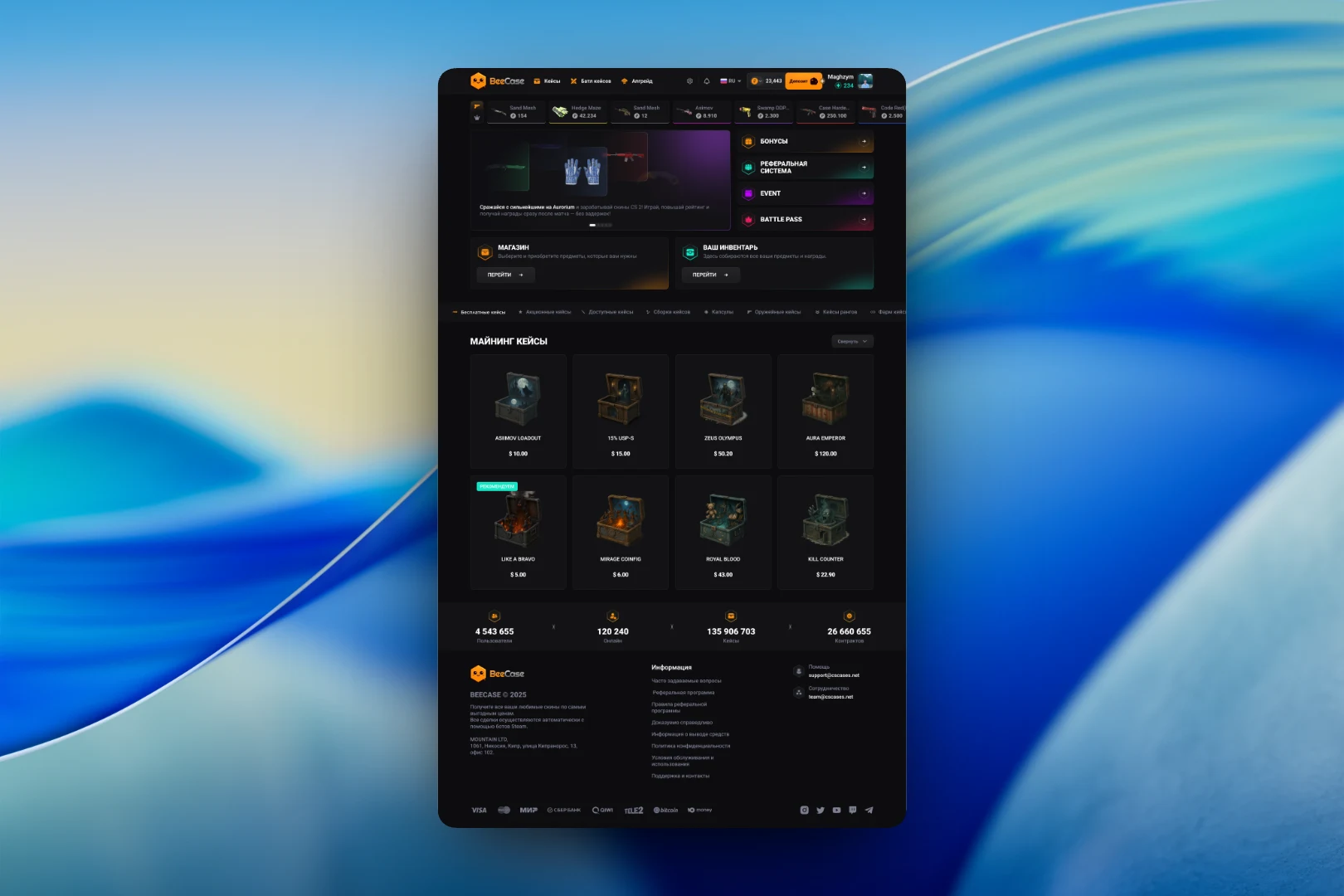
The header holds the main sections — "Cases", "Case Battle" and "Upgrade" — a language switcher, the balance and a prominent "Deposit" button. Below it runs a ticker of the latest dropped skins with prices, showing that something is happening on the site right now.
The first screen is split into a promo slider and a vertical menu with four entry points: "Bonuses", "Referral system", "Event" and "Battle Pass". Below are the shop and inventory cards, followed by the catalog. Cases are divided into categories — free, promotional, affordable, collections, capsules, weapon cases, rank cases — and the category tabs are pinned as a horizontal bar. Each case has its own illustration, name and price, and recommended ones are marked with a separate badge.
Profile and inventory
The top of the user account gathers everything about the user: an avatar with their level, an experience bar to the next level, their ID and balance with "Top up" and "Withdraw" buttons. On the right are quick links to bonuses, the referral program and the "Provably fair" section, where you can verify the fairness of drops.
The inventory is split into skins, cases and a bonus inventory. For a collection that can grow quickly we added search by name, a price range filter, sorting and categories. A skin card shows the item, its name, value and a "Sell" button, and a colored strip at the bottom indicates rarity.
Levels and bonuses
The level system is the main retention tool. The rewards page shows the current experience bar and the reward for the next level, such as a free case, with a "Claim reward" button. Below is a track of level rewards: a balance bonus, cases, an auction discount, a profile frame, a higher chance in upgrades. Claimed rewards are marked with a check, and the current one is highlighted. You can also buy a leveling booster here.
The "Bonuses" section gathers every way to get something beyond opening cases: the current level, free and promotional chests, activity leaders and a skin lottery. Below are a promo code field, a push notification toggle and bonuses for following the social networks and messengers. Each action uses the same card with a button, so the list is easy to scan no matter how many mechanics it contains.
The result
We built an interface in which many game mechanics fit into a clear structure: a case catalog, an inventory with filters, level progress and a dedicated bonus hub. The user always has a next goal — a level, a reward or a free chest — and every action on the site is one or two clicks away from any page.