About the project
Dostupny Gruz is a mobile app for organizing freight transport. It is used to assign trips to drivers and track how they are carried out: where the cargo is picked up, where it is going and what stage the trip is at. The screens show raw material shipments between cities — for example, category 3A scrap metal.
The challenge
Two parties with different goals are involved in this kind of transport. The person organizing the trips needs to see the full picture — which trips are awaiting confirmation, which are already on the road and which are open — and to manage the directories of drivers, loading points and product items. The driver needs something else: to find a suitable order, take it and complete the trip from loading to delivery without getting lost in addresses and contacts. We needed to design an interface that covers both scenarios and stays simple on a small phone screen.
Trips on the map
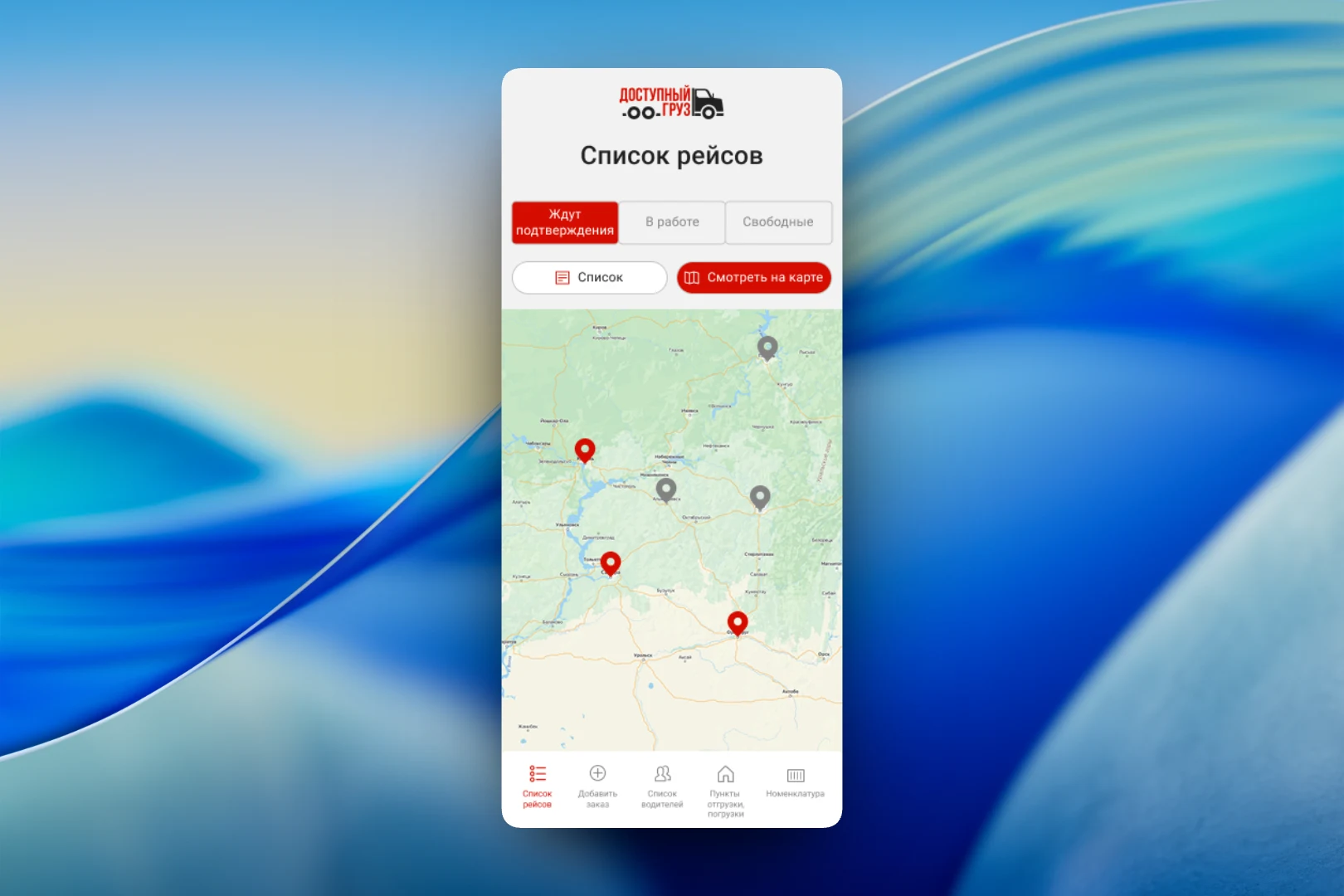
The main screen is the “Trip list”. Trips are split into three tabs by status: “Awaiting confirmation”, “In progress” and “Open”. They can be viewed as a list or on a map, where every loading and delivery point is marked with a pin: active ones in the brand red, the rest in gray. The bottom menu opens the sections for managing transport: “Add order”, “Driver list”, “Shipping and loading points” and “Product items”.
Tapping a pin opens a card right on top of the map: the cargo name, the stage (“Loading”), the address down to the warehouse number and the planned date. The map also shows a truck icon — the current position of the vehicle carrying out the trip.
Orders for the driver
The driver sees a feed of available orders. Every card is structured the same way: from where to where, the cargo and the price in two variants — for bank transfer and cash payment. The price is stated either per trip or per ton, and this is labeled right in the card to avoid any ambiguity. Orders can be sorted and filtered; the selected filters, such as the loading point or cargo type, are shown as chips above the list and removed with a single tap. Every card has a “Take order” button.
A trip in progress
A taken order turns into the “Trip order” screen. At the top are the route, the cargo and the status — for example, “On the way”. Below are two expandable blocks: “Loading” and “Delivery”. The block for the current stage is expanded and contains everything the driver needs on site: the warehouse address, the planned date and the contact person with their phone number and position. Two actions are pinned at the bottom — “Complete trip” and “Decline trip”.
The result
We designed an app in which the transport organizer sees all trips by status and on the map and manages drivers, loading points and product items, while the driver finds an order with a clear price, takes it and completes the trip step by step — with addresses, dates and contacts at hand.