About the project
Fotomixer is a mobile app for controlling a device that photographs products. Users connect to the device from their smartphone, choose the content they need — a single photo, a series of shots, a 360 photo, 3D or video — set the file format and background, and start shooting. Pricing plans and the account balance live in the app as well.
The challenge
Shooting product photos is routine work, especially for marketplace sellers, where every platform has its own photo requirements. We needed to design an interface in which a person with no photography experience can quickly connect to the device, choose the shooting type and settings, and understand how much it costs — without unnecessary settings on screen.
Connecting to the device
The first step is as short as possible: the app opens the camera with the hint “To get started, point the camera at the device's QR code”. The scanner frame is highlighted in the brand blue, and there is nothing else on the screen — no forms and no picking from a list. The QR code on the stand next to the device links it to the user's account.
Choosing content and settings
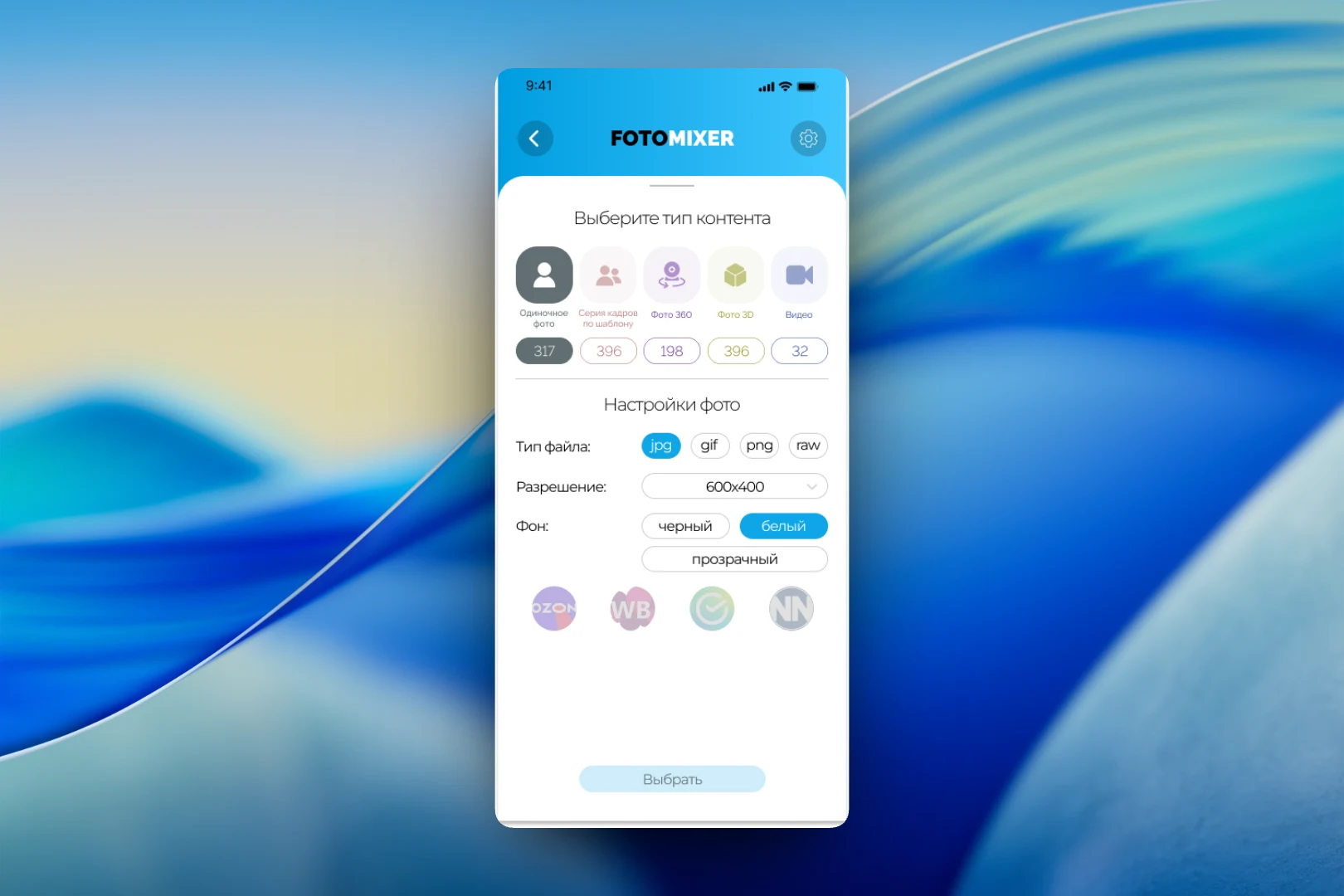
The main working screen is “Choose content type”. Five options are laid out in a row as large icons, each with its own color: “Single photo”, “Template-based series”, “360 photo”, “3D photo” and “Video”. Under each type is a counter showing the available volume for that kind of shooting.
Below are the “Photo settings”: file type (jpg, gif, png, raw), resolution from a drop-down list and background — black, white or transparent. A separate row holds marketplace icons, including Ozon and Wildberries: the idea is to quickly apply settings that meet a specific platform's requirements. The choice is confirmed with a single “Select” button.
Pricing plans
We presented pricing so it can be compared without a calculator. Each type of shooting has its own card: “One-off photo”, “Series photo” and so on. Inside are three columns: the number of shots in the package, the discount and the final price. The bigger the package, the higher the discount — from 0% to 25%. Below are the cost of the monthly subscription and a “Go to connection” link.
Personal account
The personal account brings together everything related to the account: phone number, username and email, with a note that confirmed contacts help protect the account. Separately there is the balance with a top-up button, a toggle for tips for new users and the status of two-factor authentication.
The result
We designed an app in which the path from connecting to the device to shooting takes just a few steps: scan the QR code, choose the content type, set the format and background. Packages with clear discounts, the balance and account settings are gathered in the same interface, so users don't have to go to the website to pay or configure their work.