About the project
INOE is a mobile app for ordering restaurant food for takeaway or delivery. Users choose a pickup location, build an order from the menu, add extras to dishes if they want, and pay for everything in the app without standing in line at the counter.
The challenge
Ordering food from a phone is a scenario people repeat often and usually on the go. If an extra screen or a confusing choice gets in the way between opening the app and paying, people simply walk up to the counter. We needed to design a short path: where to pick up, what to order, how much it costs — with a minimum of steps and no overloaded screens.
Where to pick up the order
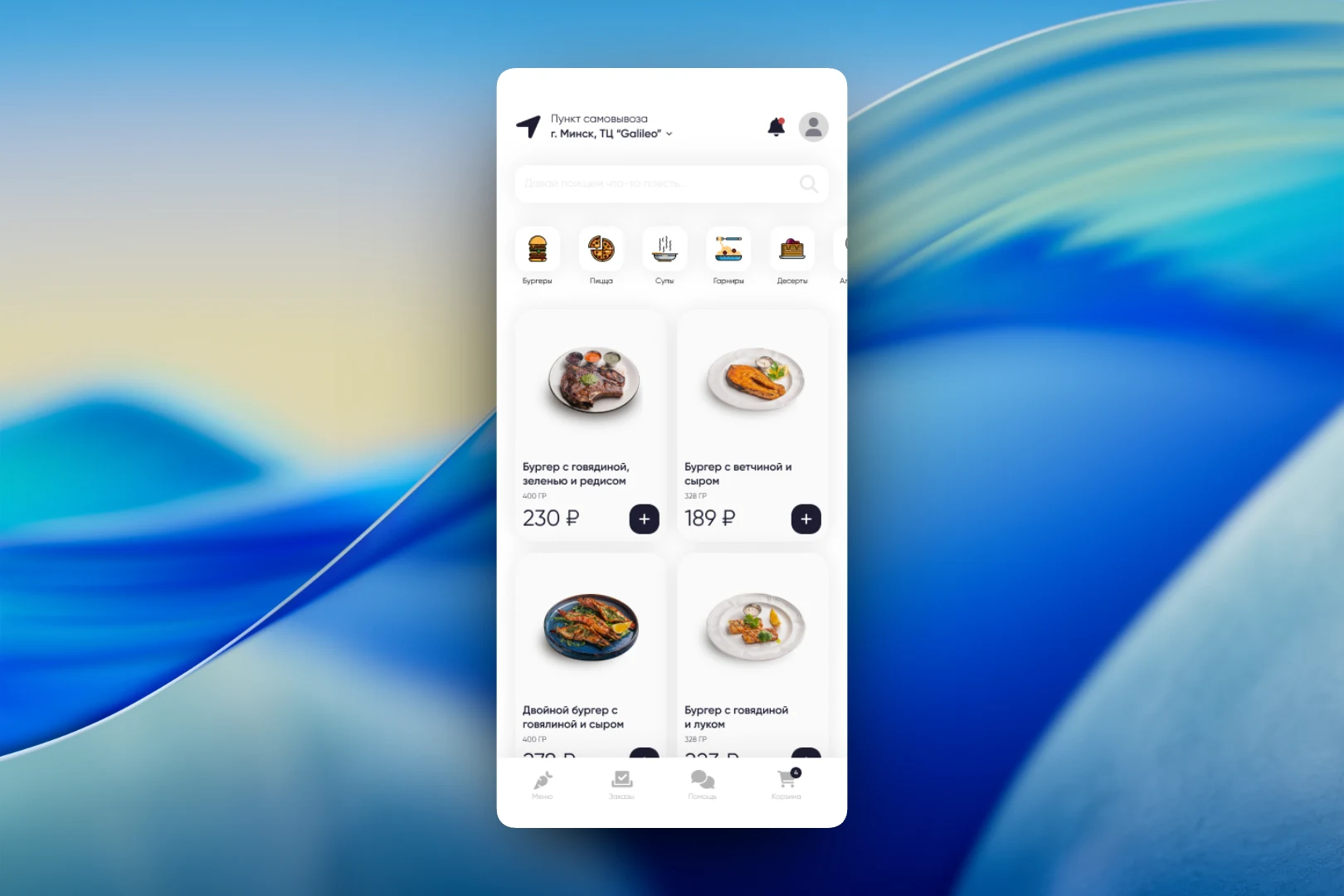
Everything starts with the address. The app header always shows which location is selected: a pickup point with the shopping mall's address. Tapping it opens a city map with restaurant markers, where a different location can be chosen. The map is deliberately light and calm so that only the venue markers stand out, and a round arrow button takes users back to the menu.
The menu
The main screen is the menu. At the top is a search bar with a friendly hint, “Let's find something to eat…”, and below it a horizontal strip of categories with icons: burgers, pizza, soups, sides, desserts. Dishes are shown as cards in two columns: a large photo, name, weight and price. The “+” button on a card lets users add a dish without opening it. The bottom menu has four sections — “Menu”, “Orders”, “Help” and “Cart” with a counter of added items.
Dish card and add-ons
If users want a closer look at a dish, it opens in a bottom sheet over the menu. Here the photo is bigger, along with a description, weight and nutritional value per 100 grams. Below are extras that can be added to the order: salt, vegetables, cheese, sauce. A selected extra is shown with its own image and a remove icon, so the dish's composition is visible at once. At the bottom there is a single button — “Add to cart”.
Cart and payment
In the cart, the “Pickup / Delivery” toggle comes first — the rest of the checkout depends on it. For pickup, the restaurant where the order will be collected is shown, and it can be changed right there. Each item can be removed with a single tap. Below the list, redeemed bonuses and discounts are shown separately, along with the total amount due. The “Pay for order” button is pinned to the bottom of the screen, next to the logos of the supported cards: Visa, Mastercard and Mir.
The result
We designed an app in which an order takes just a few actions: choose a location on the map, add dishes from the menu, customize them if desired and pay. The pickup address is always in view, bonuses and discounts are visible before payment, and switching between pickup and delivery doesn't require a separate flow.