About the project
Laffy is a wishlist mobile app: users put together lists of gifts they'd like and share them with friends and family so they get what they actually want. Around the wishlist, the app has other flows too — the DobroStars charity section and dedicated screens for kids.
The challenge
A classic wishlist is just a list of links. We had to design an interface where wishes become a reason to connect: friends see what to give, the person sees that someone is already planning to make their wish come true, and kids can take part on equal terms with adults — in a form that is clear and warm for them.
Profile and wishlist
The user profile is both a business card and a wishlist. The header, on a bright gradient background, holds the photo, a Premium badge, the name, date of birth and a view counter. Below is a short bio and the main block: “What gifts would you like to receive?”. A hint right in the interface asks users to list realistic things their friends can afford.
Each wish has a gift icon. If it turns orange, it means one of the friends wants to fulfill that wish. This way the user gets a signal without extra notifications, and gift-givers can see which items are already “taken”.
DobroStars
The main screen of the DobroStars section is designed in a children's illustration style — hand-drawn kids with balloons, clouds and the sun. There are only three actions: “Give help”, “Order a greeting” and “Drawing contest”. Each leads to its own flow, and the screen itself is not cluttered with anything besides these buttons.
Flows for kids
For kids, we created a separate visual language. The add-a-gift screen is styled as a lined school notebook page with a red margin: just two fields — the gift's name and description — and a “Done” button. A child doesn't need to figure out the adult wishlist interface; they simply “write down” their wish.
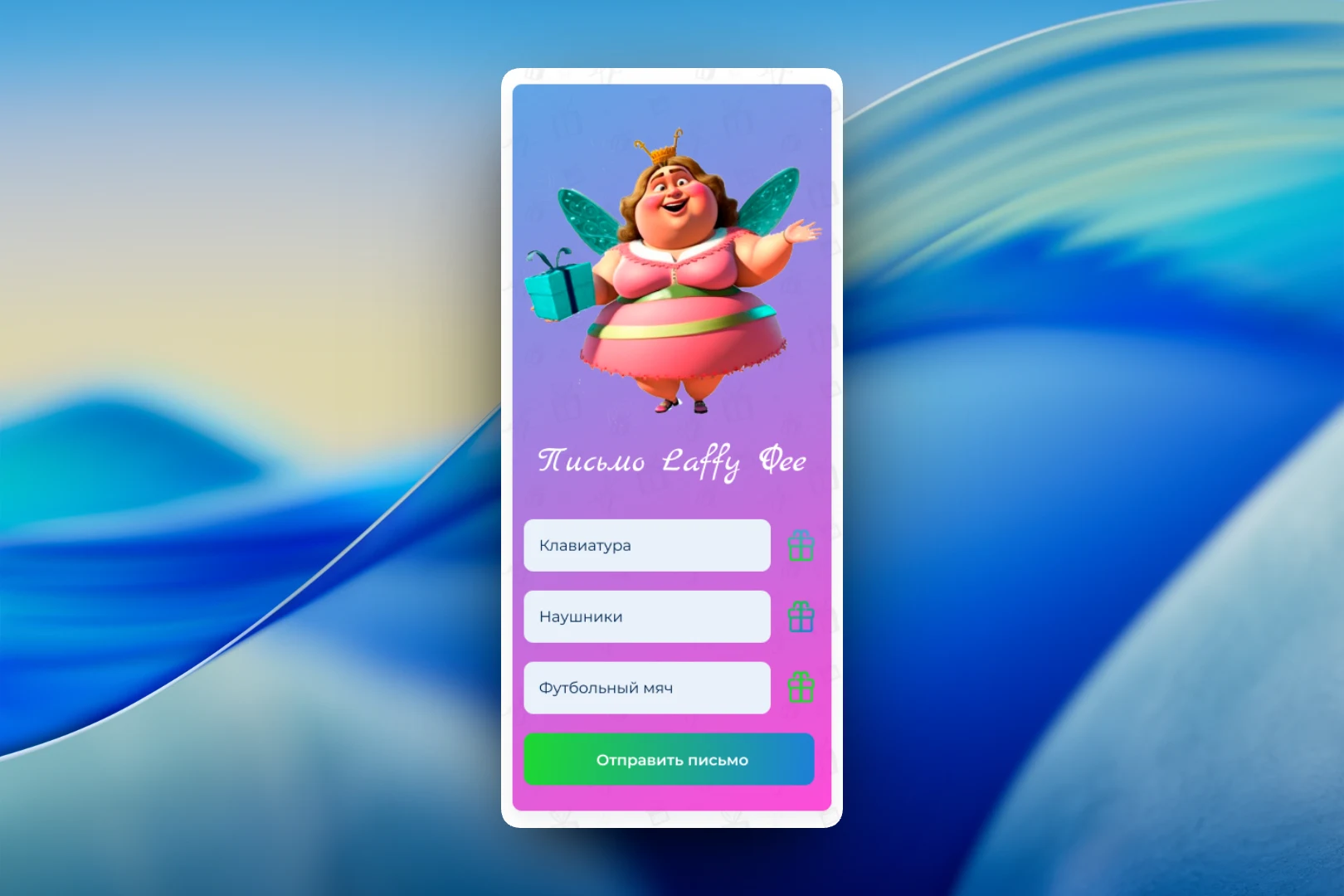
The most magical flow is “A letter to the Laffy Fairy”. A fairy character holding a gift, a handwritten heading, three lines for wishes — for example, a keyboard, headphones and a football — and a “Send letter” button. The form is short, and the gift icons next to each line tie it to the main wishlist.
The letter screen is also prepared in a high-resolution version for high-pixel-density displays: the character, the handwritten heading and the gradient background have to stay sharp on any device — for a young audience, it's the fairy that brings the flow to life.
Result
We ended up with an app where the wishlist works as a social tool: friends see what to give and can “reserve” a wish, while kids get their own clear flows — a notebook page for a gift and a letter to the fairy. The DobroStars charity section is built into the same product and doesn't require users to switch to another app.