About the project
Music Solution is a background music service for businesses: shopping malls, stores and other venues have players that play themed playlists and ad blocks on a schedule. We designed the admin panel through which the service's operators manage the entire network of devices: monitor their status, configure music and ads for each location and see exactly what played in the venue.
Challenge
There are hundreds of devices in the network, located in different cities and at different sites, and each one needs to be monitored: is it online, which software version is installed, is there enough space for music, what is playing right now. Previously, some of these operations required technical knowledge or access to the device itself. We needed to bring all management into one screen where the operator selects a location on the left and gets all its settings on the right.
Device network and location card
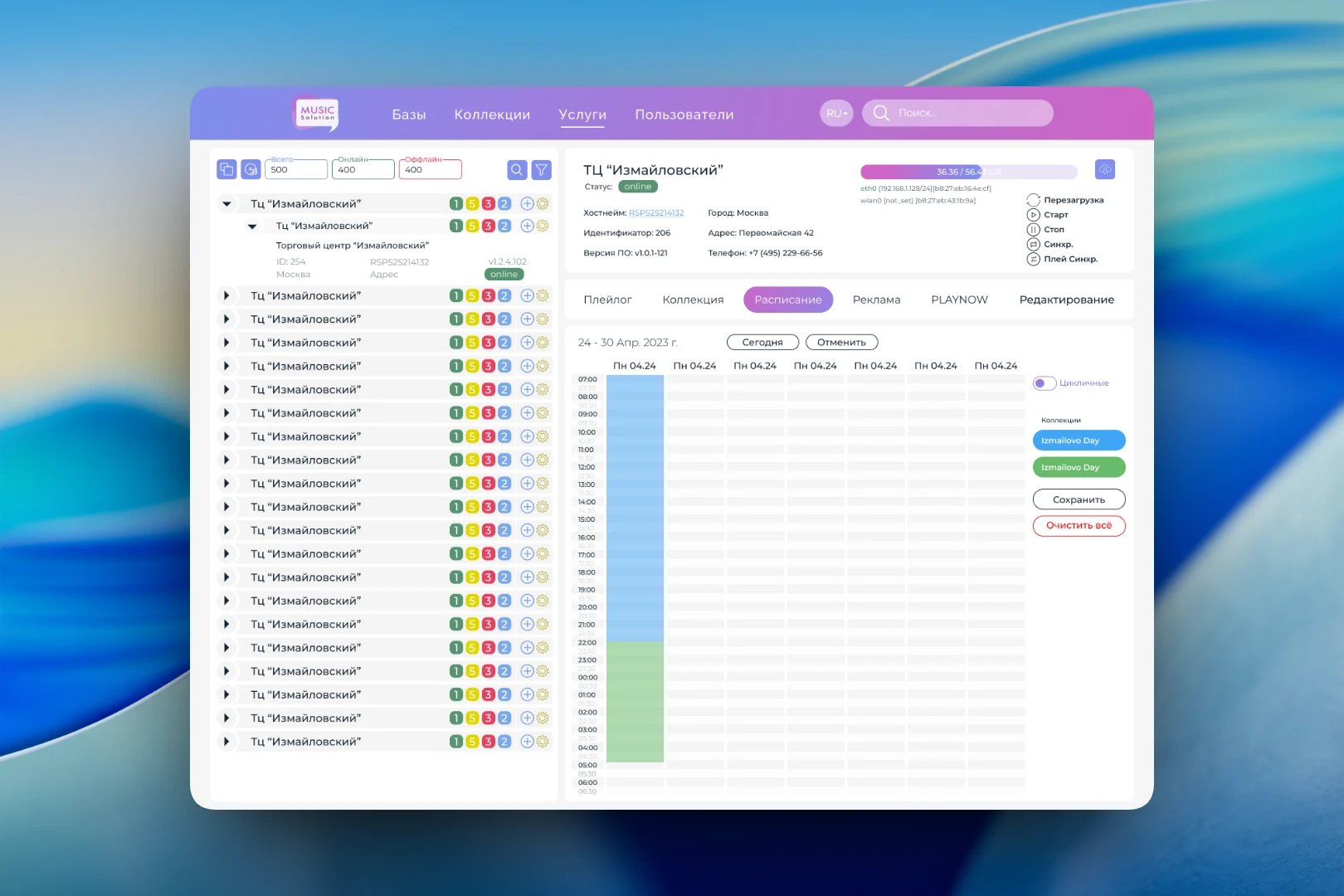
The left column is a tree of sites. At the top is a network summary: how many devices in total, how many online and how many offline, plus search and filters. Each site has colored counters showing the status of its players, and when expanded, the device ID, hostname, city, version and status are visible. Here you can also add a new device or open its settings.
On the right is the card of the selected location: site name, status, hostname, identifier, software version, city, address and phone. A bar shows how much of the device's storage is used, next to the network interfaces. The control panel is placed separately: reboot, start, stop, sync and playlist sync. Below are the “Play log”, “Collection”, “Schedule”, “Ads”, “PLAYNOW” and “Editing” tabs.
Play log: what played in the venue
The play log answers the question clients ask most often: what was playing at a certain time. The operator picks a date and gets a table with the play time, collection, artist, track title and label. This is needed both for handling complaints and for reporting on music used.
Schedule and ads
In the “Schedule” tab, music collections are laid out across the week as a calendar grid in half-hour steps. Each collection has its own color, so you can see where the daytime playlist gives way to the evening one. The schedule can be made cyclical, saved or cleared entirely, and the “Today” button returns to the current week.
Ad blocks are configured separately: each has a name, days of airing, hours and the minute at which the block interrupts the music. Blocks are added, edited and deleted right in the table, and at the bottom there are actions to configure, upload, copy and delete the whole set.
Result
The Music Solution admin panel lets an operator manage the entire network of players from one window: see which devices are online, remotely restart and sync them, build a weekly music schedule, set up ad airing and check in the play log what played at each location.