About the project
namaz.moscow is a prayer times service for Muslims. It shows the times of the five daily prayers for a selected city, the qibla direction, a calendar with the schedule for any date and audio recordings of prayers. We designed its mobile interface.
The challenge
People open a prayer schedule several times a day, often on the go, to quickly check one thing: how long until the next prayer. So the main screen has to answer that question immediately, without scrolling or navigating. At the same time, prayer times depend on the city and the madhab, and these settings should change in one tap rather than being buried deep in a menu.
The main screen
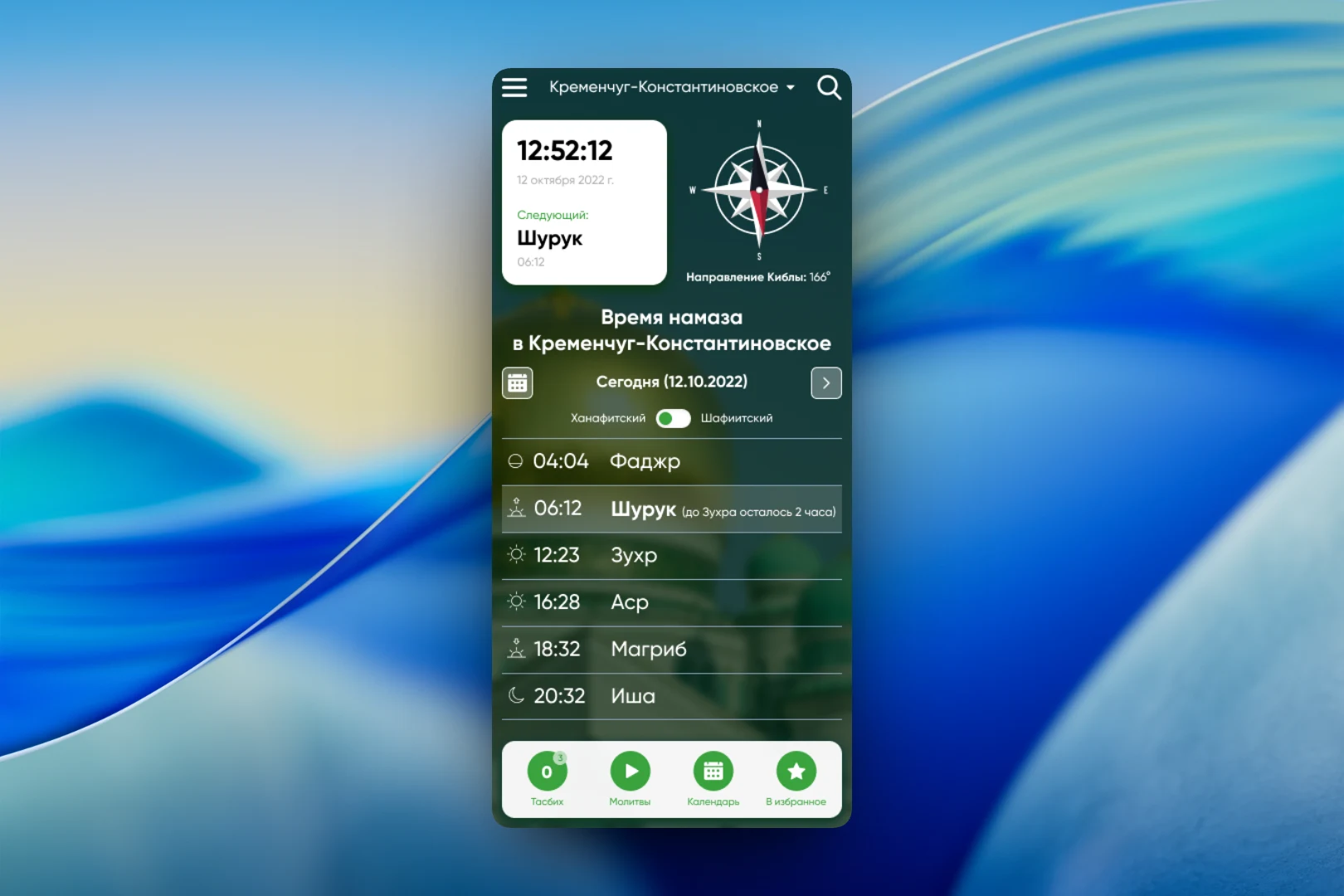
The first thing on the screen is a card with the current time, date and the upcoming prayer: “Next: Shuruq, 06:12”. Next to it is a compass showing the qibla direction with the exact value in degrees. Below is today's schedule: Fajr, Shuruq, Dhuhr, Asr, Maghrib and Isha, each prayer with its own icon for the position of the sun. The current row is highlighted, with a hint showing how much time is left until the next prayer.
Above the schedule is a “Hanafi / Shafi'i” toggle: the time of Asr differs between madhabs, and users choose the right option right on the main screen. The arrow next to the date pages through the schedule for the following days.
City and calendar
The city name sits in the header, and tapping it opens “Choose a city”: an alphabetical list with letter dividers — Astrakhan, Grozny, Derbent, Kazan, Moscow, Makhachkala, Nalchik and other cities. The list is long, so the main screen header also has a search.
The “Calendar” section is for when the schedule is needed in advance — for example, to plan a trip or a working day. Users pick a date in the monthly grid, and the schedule of all prayers for that day immediately appears below it, with the same madhab toggle.
Prayers in audio
The “Prayers” section collects audio recordings. At the top is a player with the title of the current recording, playback progress and skip buttons; below is a numbered list in which each recording has its own play button. The recording that is playing is highlighted in the list, so it's always clear what is on now.
All sections are available from the bottom bar: “Tasbih” with a counter, “Prayers”, “Calendar” and “Favorites”. The background is a darkened photo of a mosque — it sets the mood without getting in the way of reading the times.
The result
We designed an interface in which the answer to the main question — when is the next prayer — is visible at a glance, and choosing the city, madhab and date takes no extra steps. The qibla direction, calendar, audio prayers and tasbih are gathered in one place and available from a persistent bottom bar.