About the project
An app for data collection terminals (DCT) that we designed for warehouse operations at a furniture factory. The storekeeper uses it right in the warehouse: opens a document, scans package barcodes and checks the goods actually received against what is listed in the goods receipt order.
The challenge
Warehouse accounting at a furniture factory revolves around packages: a single piece of furniture can arrive in several boxes, and each one has to be recorded. Checking this manually against paper documents takes a long time, and errors only surface at shipping. We needed to build an interface in which receiving comes down to a simple loop: open a document — scan — see the discrepancies. On top of that, the DCT screen is small, and people use it on the move, often with one hand.
Document card
Every document opens on the "Main" tab. It brings together the details: the order on which receiving is based (a link to a production stage), number and date, sender, warehouse, person in charge and executor, room and receiving zone, and a comment field. Fields filled from a reference list are marked with a "…" button or a dropdown arrow, so it's immediately clear where a value is entered manually and where it is selected.
We made two versions of the interface for different devices: one with an extended bottom bar (shipping, picking, receiving, reports, settings) and a compact one that keeps only shipping, receiving and settings.
Plan and actual
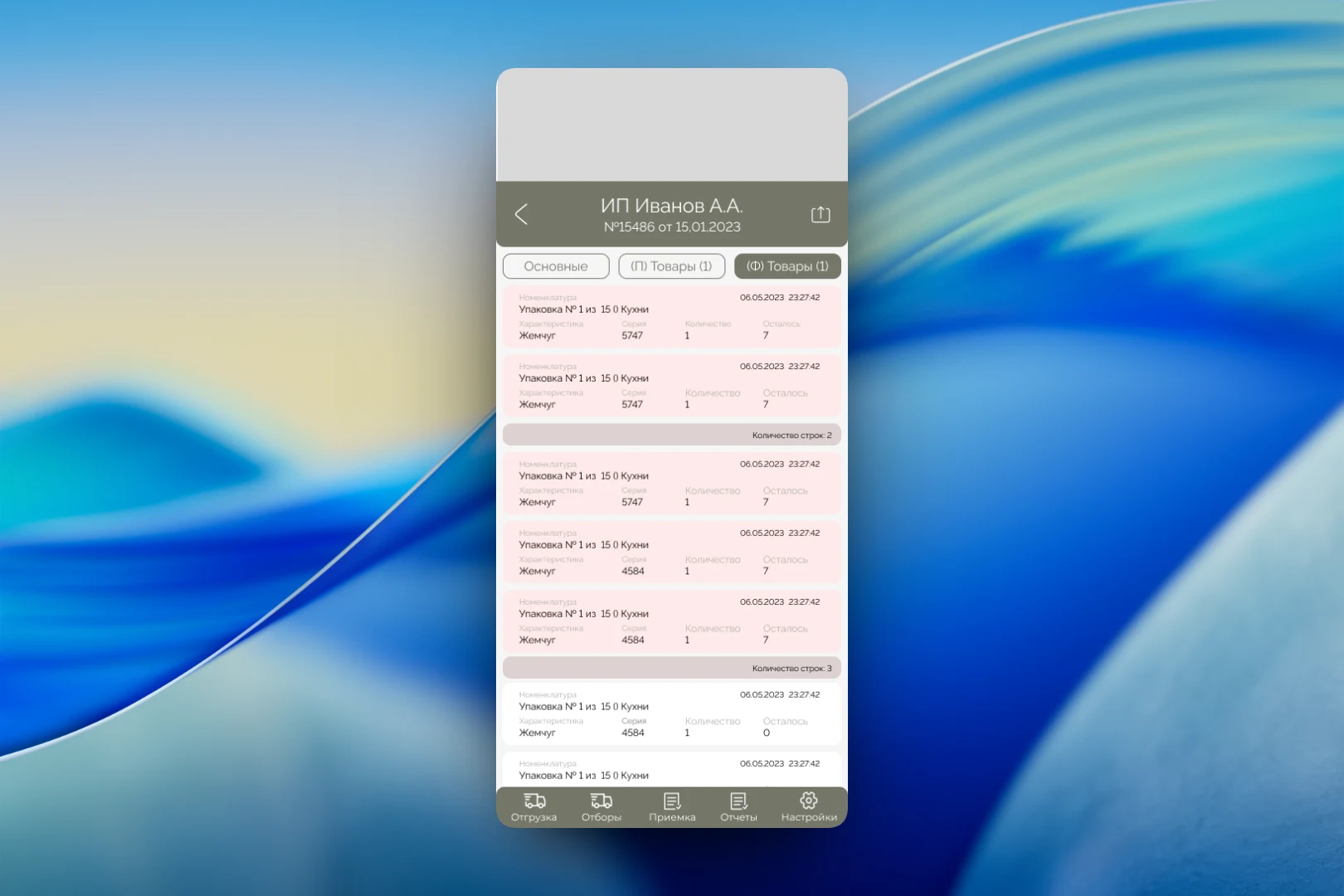
The key idea is to split goods into two tabs. "(P) Goods" is the goods receipt order, i.e. what is supposed to arrive: item, attribute (for example, the color "Pearl"), batch and quantity. "(A) Goods" is what the storekeeper has actually scanned.
On the actual tab, the top of the screen is taken up by the scanner area — in the mockup it shows a barcode. Below it is the list of lines "Checking the quantity of goods in the goods receipt order": each item gets a scan time, and a missing batch is highlighted in red so it can't be overlooked.
For documents with many lines, we added grouping: items are combined into blocks labeled "Number of lines", and each line shows how many packages are still left to receive. Lines where receiving isn't complete are colored pink, and closed ones are white. The storekeeper sees progress simply by scrolling through the list, without a separate report.
The result
The app moves receipt checking from paper documents to the terminal screen: details, the planned contents and the scanned actuals sit in one document on adjacent tabs. Discrepancies and missing data are highlighted in color right during work, while the restrained palette and large elements are designed for use directly in the warehouse.