About the project
Saints Row is an internal panel for a team that runs Facebook ads through a large number of accounts. We built it for the same client as the Aurorium anti-detect browser. A single interface brings together accounts, ad accounts, business managers, pages, campaigns and ads, and launching ads across many ad accounts at once is done from a template. We designed the interface: the ad account tables, account import and the bulk ad creation tool.
The challenge
When there are dozens or hundreds of ad accounts, the standard ads interface stops working: you have to log into each account separately, and identical campaigns have to be assembled by hand over and over. We had to design a workspace where an operator sees the status of every ad account in one table, adds accounts in batches and launches the same kind of ads to selected accounts in a single pass.
Ad accounts in one table
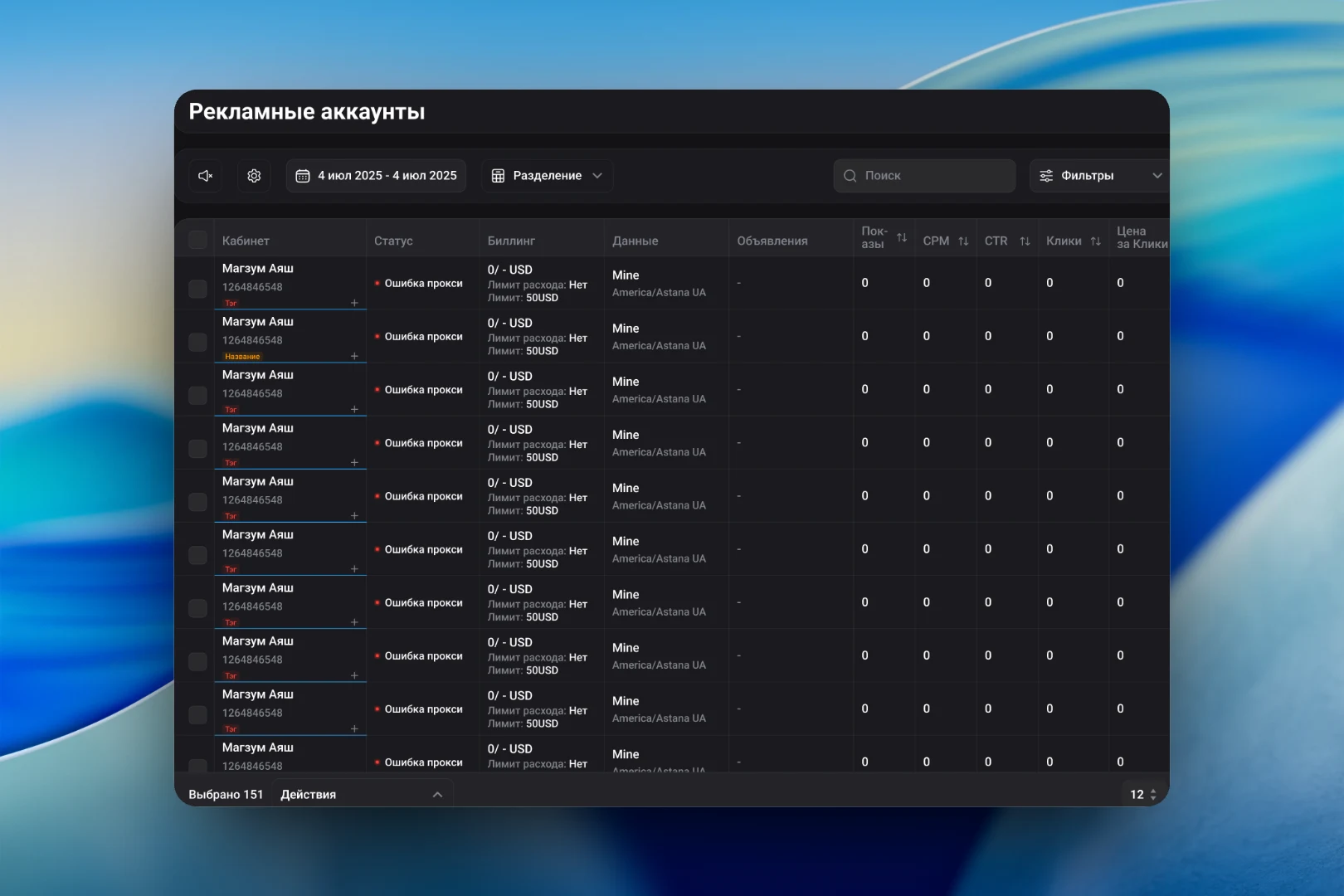
The main working screen is a table of ad accounts. Each row shows an account with its ID and colored tags, status, billing with a spending limit, linked data and time zone, the number of ads and key metrics: impressions, CPM, CTR, clicks, cost per click. Statuses are marked with a colored dot, so problem accounts — for example, ones with a proxy error — stand out immediately.
Above the table are the period picker, data breakdown, search and filters. Metrics can be sorted by column. At the bottom are a counter of selected rows and an "Actions" menu: any operation can be applied to a hundred accounts at once instead of repeating it in each.
Adding accounts
A new account is set up in a single window. On the left are the login details: name, user agent, cookies in JSON format, group, proxy, note, login and password and, if needed, two-factor authentication. On the right are settings for which data the service will refresh for the account: statistics, extended card data, page and business manager statuses, plus the refresh interval. A hint next to them reminds you to keep only statistics when bans occur. For large volumes there is import from a file and bulk import.
Template-based ad launch
The "Ad template" tool solves the main routine task — creating identical campaigns in many ad accounts. The template list shows for each one the objective, budget and strategy, geo with exclusions, age, gender and language targeting, devices and placements: Facebook, Instagram, Messenger, Audience Network. Long values, such as a list of regions, expand in a tooltip so the row doesn't bloat.
The template window is split in two. On the left are the names for the campaign, ad sets and ads, the budget range and links. On the right are the creatives with an "Add creative" button and a shared thumbnail, ad links one per line and URL parameters. So that links don't have to be assembled by hand for each account, we added macros — pixel ID, template name, account and page ID — with an example of the resulting link right in the interface. Launch is done with the "Start" button, a repeat run with "Restart".
The result
The service turns working with many ad accounts into working with a single table. Accounts are added in batches, their status and metrics are visible in a shared list, and campaigns of the same kind are created from a template in all selected accounts at once. The side menu connects this to the surrounding tools: proxies, flow settings and the activity log.