About the project
This is the interface of a karaoke app for a big screen. A guest signs in to their account, finds a song in the catalogue or picks a ready-made playlist, and sings along, following the lyrics and the voice visualisation right on the screen.
The challenge
Karaoke is a group activity, often in a dimly lit room with a microphone in hand. The interface had to be easy to read from a distance, and the path from switching it on to the first song had to be as short as possible. Our task was to design the catalogue, playlists and performance screen in a single night-time style that supports the party atmosphere.
Sign-in
The welcome screen is split in two. On the left are "Welcome!" and large buttons: "Sign in", sign-in with Facebook or Google, and registration. On the right are the venue's logo, a photo of a group singing with a sound wave, and three short benefits about the microphone, the sound and the app. A dark background with purple highlights sets the mood for the whole product.
Song search and playlists
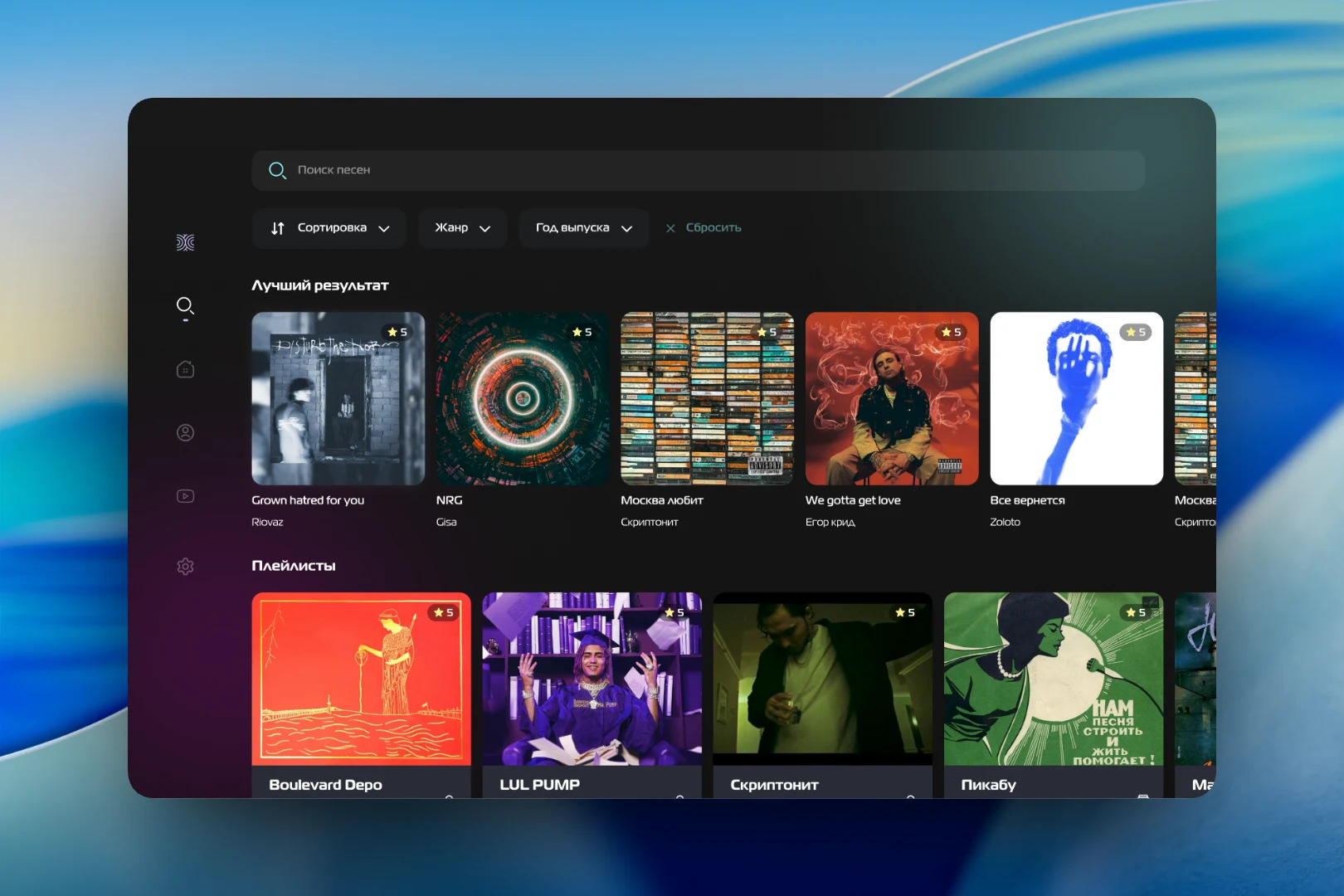
Navigation sits in a narrow column of icons on the left: search, home, profile, video and settings. The search screen starts with a "Search songs" bar and filters by sorting, genre and release year, with a reset button. Below are a "Top result" block with track covers and their ratings, and a selection of playlists. Large covers let you recognise a song at a glance, without even reading the title.
A playlist page — for example, "New this week" — shows a numbered list of tracks with cover, title, artist and duration. The selected song is highlighted with a gradient frame, and on the right its large cover appears along with a star rating from users and two buttons: "Sing" and "Add to favourites".
Performance
During a song the screen is almost empty — just two lines of lyrics in a large font in the centre. Words that have already been sung turn pink, so the singer always knows where they are. At the top there are two voice visualisation tracks in pink and turquoise with score counters next to them; at the bottom there are a timeline and a control panel: settings, repeat, equaliser and other options around the central "Play" button.
The result
We designed a karaoke interface for a big screen where every step — signing in, searching, choosing a playlist and performing — takes just a few taps. Large typography, a dark palette with neon accents and a minimum of elements during the song make it convenient in the real setting of a karaoke room.